Digital Business Card for Realtors: Why Every Agent Needs One
February 18, 2026 • Updated 1 week, 4 days ago
You hand out 500 business cards a year. How many actually get saved? Most end up in a drawer, a trash can, or run through the wash. Meanwhile, your competitor just texted a client a link to their digital business card — and that client saved their number in one tap.
If you're a real estate agent still relying only on paper cards, you're making it harder for people to contact you. Here's how a digital business card works for realtors, what it should include, and how to set one up in a few minutes.
What is a Digital Business Card for Real Estate?
A digital business card is a web page with your contact info, photo, bio, social links, and — for realtors specifically — your featured property listings. Instead of handing someone a paper card, you share a link or let them scan a QR code. They tap "Save Contact" and your info goes straight into their phone.
Here's what a realtor's digital business card looks like on vCard Garden:
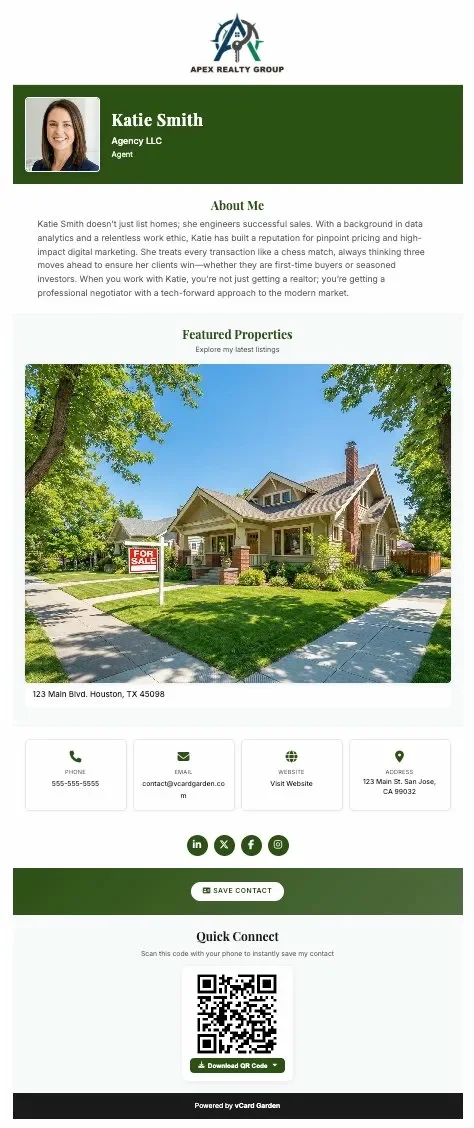
That's a complete professional presence on one page: agency logo, headshot, bio, a featured listing with photo and address, phone, email, website, office address, social links, a Save Contact button, and a downloadable QR code.
Why Realtors Need a Digital Business Card
Your listings change. Paper cards don't.
You close a deal, get a new listing, change brokerages — and your paper cards are instantly outdated. A digital card updates in real time. Change your info once and everyone who has your link sees the new version.
Open houses and showings
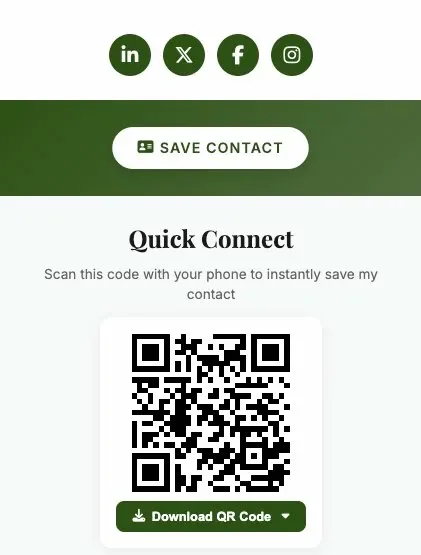
You meet 20 people at an open house. Instead of hoping they keep your paper card, put a QR code on your sign-in sheet, your flyer, or your yard sign. They scan it, see your page, save your contact. Done.
Showcase your properties
Paper cards can't show a $450,000 listing. A digital card can. The vCard Garden realtor template lets you add up to 5 featured property photos with descriptions and links to the full listing. When a potential buyer saves your contact, they're also seeing your best properties.
One tap to call, email, or get directions
Every phone number, email, and address on your digital card is tappable. No one has to manually type your number from a paper card. They tap and they're connected.
Track who's looking
Paper cards disappear into the void. With a digital card, you can see how many people viewed your page. If you shared your card at a networking event on Tuesday and got 12 views by Thursday, you know it's working.
What to Put on Your Realtor Digital Business Card
The realtor template on vCard Garden includes fields for everything an agent needs. Here's what to include:
The essentials: your name, brokerage name, title (Agent, Broker, Realtor), phone number, email, and a professional headshot. This is the minimum. Don't skip the photo — people want to recognize you.
Your agency logo. It appears at the top of your page. If you're with Keller Williams, RE/MAX, Coldwell Banker, or any brokerage, this adds instant credibility.
A short bio. Two to three sentences about your experience and what you specialize in. First-time buyers? Luxury homes? Commercial? Say it here.
Featured properties. Up to 5 listing photos with descriptions and links. This is what sets a realtor card apart from a generic digital business card. When someone views your page, they see your active listings right there.
A link to all your listings. Below your featured properties, you can add a "View All Active Properties" button that links to your Zillow, Realtor.com, or brokerage profile.
Social media links. LinkedIn, Facebook, Instagram — wherever you post about real estate. These show as clean icons on your page.
Your office address. It links to Google Maps so clients can get directions with one tap.
How to Use Your Digital Business Card as a Realtor
On your physical business cards. Print your QR code on the back of your paper cards. You get the best of both worlds — a traditional card for the handshake, and a digital version they can scan later.
On yard signs and flyers. Add your QR code to your listing flyers, open house signs, and door hangers. Anyone driving by can scan the code from the sidewalk and get your contact plus the listing details.
In your email signature. Add a line like "Save my contact: vcardgarden.com/your-name" to every email you send. Every email becomes a business card.
At open houses. Put a printed QR code on the sign-in table. Visitors scan it and have your info saved before they walk through the front door.
On social media. Share your link in your Instagram bio, Facebook page, or LinkedIn profile. When someone finds you on social media, they can save your contact in seconds.
Via text message. After meeting a potential client, text them your link instead of hoping they kept your card. It takes 3 seconds and they have everything they need to reach you.
How to Create Your Realtor Digital Business Card
Setting up a digital business card on vCard Garden takes about 5 minutes:
- Start building your page — pick the Real Estate Agent template
- Add your name, brokerage, title, and contact details
- Upload your headshot and agency logo
- Write a short bio
- Add your featured property photos and listing links
- Publish your page
You'll get a shareable link (like vcardgarden.com/your-name), a downloadable QR code in PNG, SVG, or PDF format, and a Save Contact button that adds your info directly to visitors' phones.
Plans start at $9/month for up to 5 pages. If you manage a team, the Business plan ($29/month) covers up to 50 agent pages.
Create your realtor digital business card now
Why Realtors Choose vCard Garden
Built for real estate. The realtor template includes featured property listings, agency logo placement, and a "View All Properties" link — features generic digital card services don't offer.
No app required. Your page works in any browser. Clients don't need to download anything to view your card or save your contact.
Your QR code never changes. Even if you update your phone number, switch brokerages, or change your photo, your QR code stays the same. Anything you've already printed keeps working.
Cancel anytime. No contracts, no annual commitment. If it's not working for you, cancel with one click.
Frequently Asked Questions
Is it hard to set up?
No. You fill out a form with your info, upload a photo, and hit publish. There's nothing to install, no coding, and no design skills needed. Most agents have their page live in under 5 minutes.
What if I switch brokerages?
Log in, change your company name and logo, and hit save. Your page updates instantly. Your link and QR code stay the same, so anything you've already printed or shared still works — it just shows your new brokerage.
Can I use this with my existing paper business cards?
Yes. Print your QR code on the back of your paper cards. When someone scans it, they go directly to your digital page where they can save your contact, see your listings, and connect with you on social media. Your paper card becomes a gateway to everything else.
How much does it cost?
The Starter plan is $9/month for up to 5 pages — plenty for an individual agent. The Pro plan is $19/month for up to 25 pages, and the Business plan is $29/month for up to 50 pages, which works well for teams and brokerages. All plans include QR code downloads, contact file downloads, logo upload, and analytics.
Can my whole team use it?
Yes. Each agent gets their own page with their own link and QR code, all managed under one account. The Business plan at $29/month covers up to 50 agent pages — that's less than $0.60 per agent per month. For larger brokerages, the Agency plan at $99/month covers up to 250 pages.
What happens if I cancel?
Your pages go offline but your data is saved for 30 days in case you change your mind. After that, it's permanently removed. There are no cancellation fees.