Free QR Code Reader
Upload a QR code image or use your camera to scan one. See what's inside instantly — links, contact info, WiFi credentials, plain text, anything. Runs in your browser, nothing to install.
Scan or Upload Your QR Code
Drag & drop a QR code image here
or click to choose a file
Want Your Own QR Code That Saves Your Contact to People's Phones?
Add your info, pick a template, and you're live at vcardgarden.com/your-name — with a QR code and one-tap contact download built in. No app needed on their end.
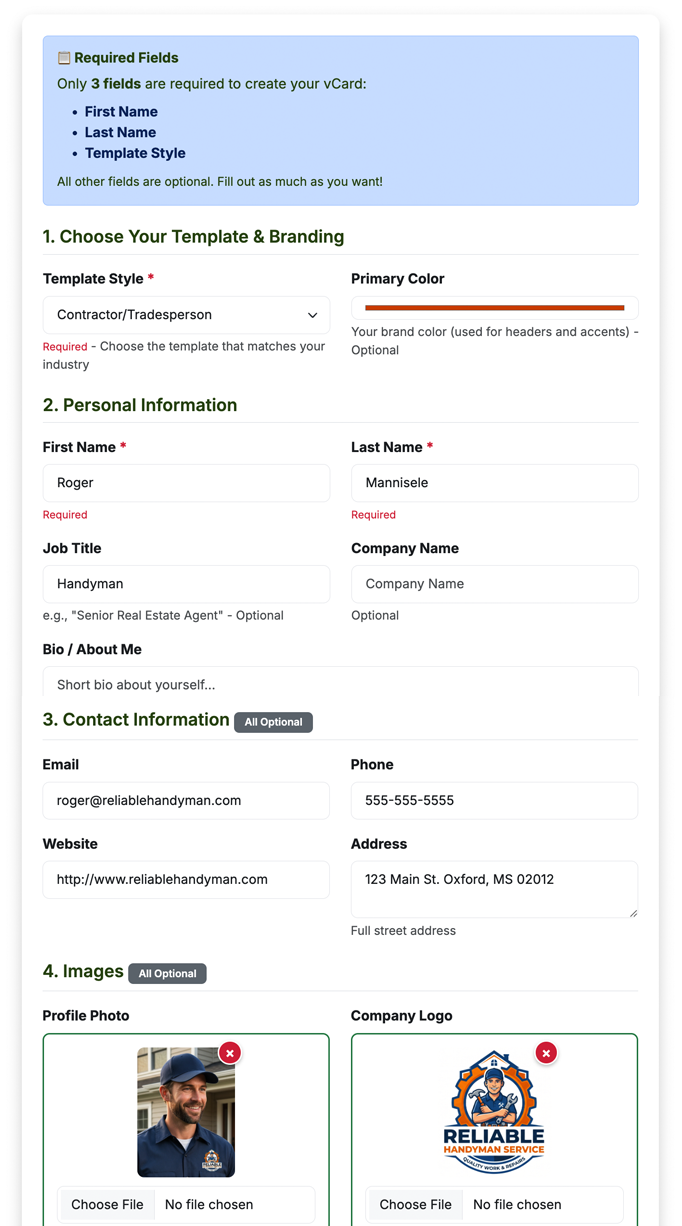
You fill this out
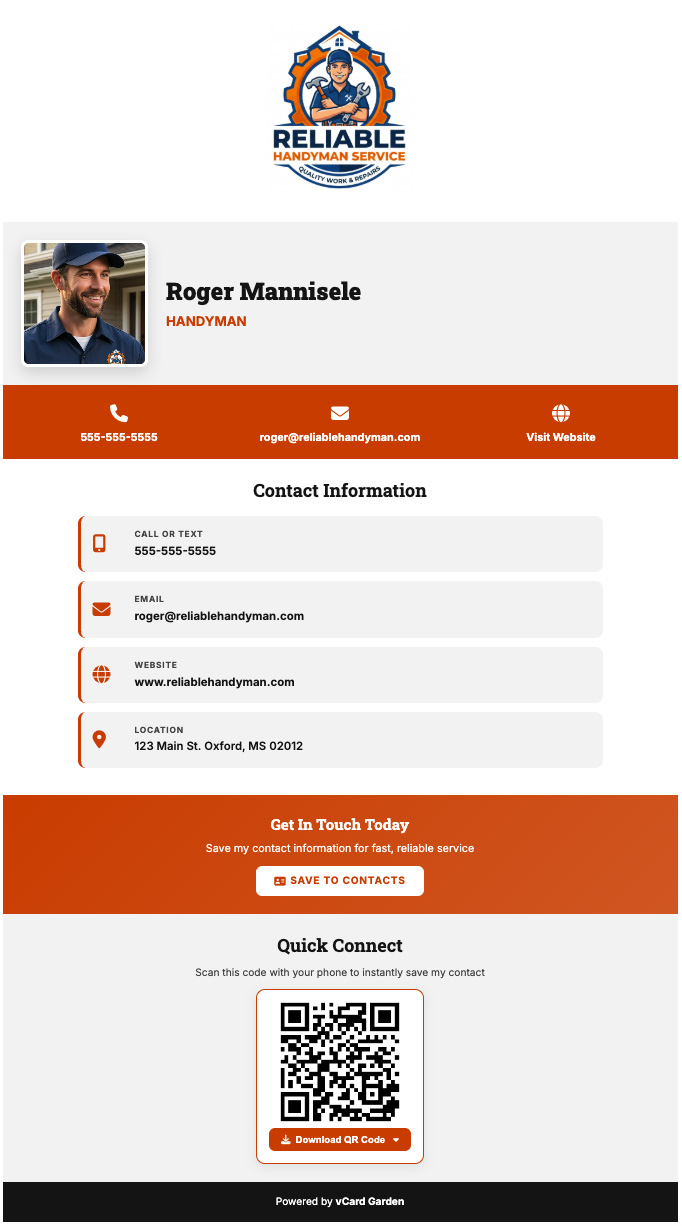
You get this page — with a QR code and Save Contact button
What you get with a vCard Garden page
Everything a QR code-based contact card needs — nothing you don't.
Know exactly who's scanning your QR code
Every page comes with analytics built in — no tracking snippets to paste, no separate account to set up. See how many people viewed your page, where they scanned from, and what device they used.
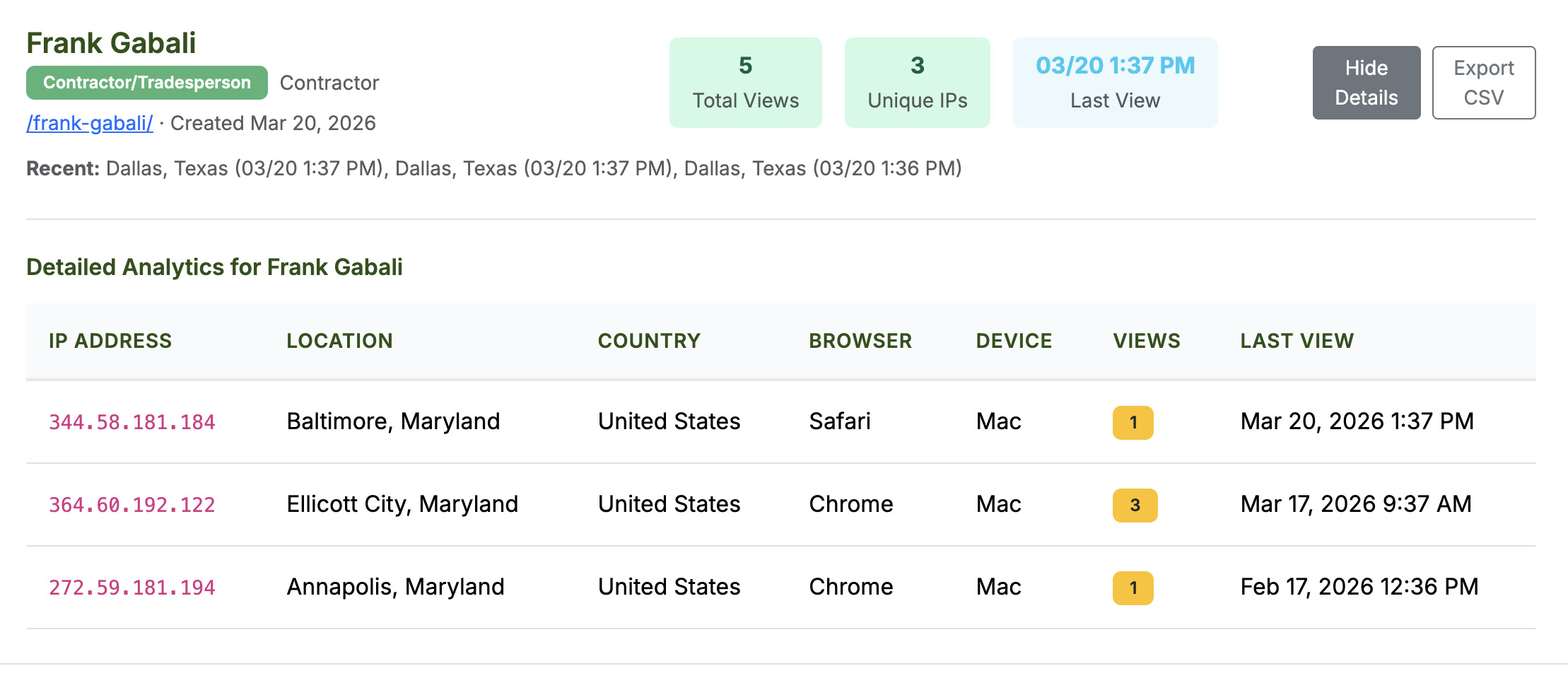
Put your QR code on the truck AND the yard sign, then check which one actually brings people in.
No App Required. No Download. No Signup.
Unlike Blinq, HiHello, and other digital card apps, the person viewing your card doesn't install anything. They scan your QR code, see your page in their browser, and tap to save your contact. That's it.
What Can a QR Code Contain?
QR codes are just containers. The black-and-white pattern encodes text — and what that text means depends on how it's formatted. Here's what you'll find inside most QR codes:
Common QR Code Types
🔗 Website URL — The most common. Scanning opens a webpage.
👤 Contact Info (vCard) — Contains a name, phone, email, and address. Scanning saves the person to your contacts.
📶 WiFi Network — Contains network name, password, and encryption type. Scanning auto-connects you.
📧 Email — Pre-fills a new email with an address, subject, and body.
📱 Phone Number — Scanning starts a call.
📝 Plain Text — Any text — a note, a code, an ID number, anything.
Why Read a QR Code with This Tool?
See Before You Visit
Someone hands you a flyer with a QR code. Do you trust it? Upload the image here and see exactly where it leads before you open it in your browser. No surprises, no sketchy redirects.
Read QR Codes from Screenshots
You screenshot a QR code from a website, a PDF, a text message, or a social media post. You can't point your phone camera at your own phone's screen — but you can upload the screenshot here.
No App Required
Most phones can scan QR codes with the built-in camera — but not all. And if you're on a computer, you don't have that option at all. This tool works in any browser, on any device.
How to Scan QR Codes on iPhone vs Android
Most modern phones can scan QR codes without any extra app — but how you do it depends on your phone.
🍎 iPhone (iOS 11+)
Open the Camera app, point it at the QR code, and a notification banner appears at the top. Tap it to open the link. That's it — no settings to change, no app to download. If it's not working, go to Settings → Camera and make sure "Scan QR Codes" is turned on.
🤖 Android
On most Android phones (Android 9+), the built-in camera reads QR codes automatically. If yours doesn't, Google Lens is built into most Android phones — open it from the camera app or search bar and point at the QR code. Samsung phones also have a QR scanner in the quick-settings panel (swipe down).
But what if the QR code is on your screen — in a screenshot, PDF, or email? You can't point your camera at your own screen. That's exactly what this tool solves: upload the image and read it instantly.
Are QR Codes Safe to Scan?
QR codes themselves are harmless — they're just encoded text. But the content they link to can be anything, including phishing sites or malware downloads. Here's how to stay safe:
⚠️ Watch Out For
- QR codes on random stickers placed over other QR codes
- QR codes in unsolicited emails or text messages
- Codes that redirect through multiple shortened URLs
- Any QR code that immediately asks for personal info or payment
- QR codes on parking meters or public kiosks that look tampered with
✓ Stay Safe
- Use this tool to preview what a QR code contains before visiting
- Check the URL domain — does it match who gave you the code?
- Be cautious with QR codes in public places anyone could replace
- Don't enter passwords or payment info on a QR-reached page without verifying the site
- If a QR code redirects to an app store, search for the app directly instead
Frequently Asked Questions
Related Tools & Pages
Get your own QR code that saves your contact to people's phones
Add your info, pick a template, and you're live — with a QR code and one-tap contact download built in. Print it on anything. Update anytime. People scan it, see your page, and save your contact in seconds.
Try It Free — No Signup to Preview →