Why Realtors Should Never Put "Phone Number" QR Codes on Yard Signs
August 02, 2026 • Updated 3 months ago
Last updated: August 2026
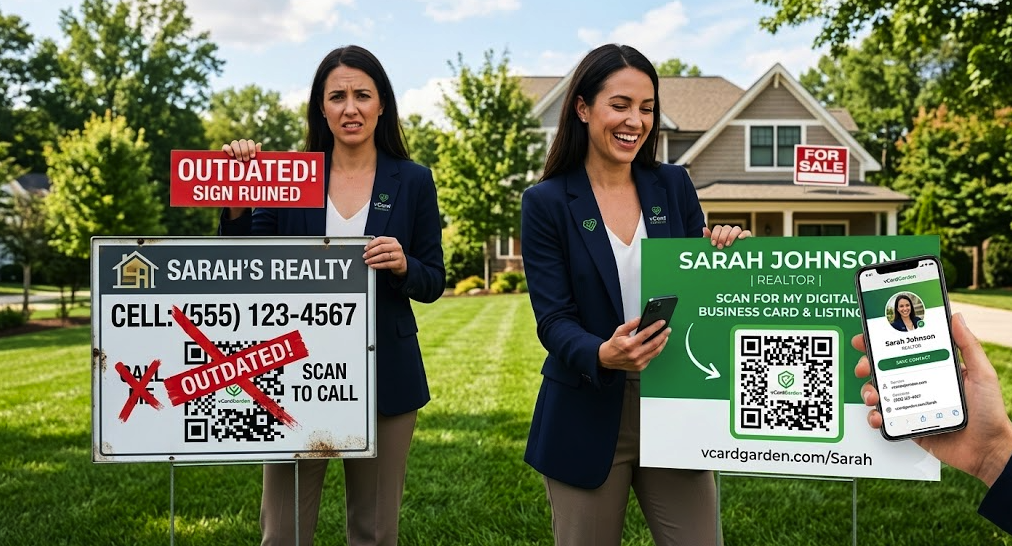
You order a set of metal yard signs. Good ones — heavy gauge, custom cut, your headshot printed at full color. Somewhere on that sign is a QR code, and inside that QR code is your cell phone number, hardcoded, forever. Six months later you switch brokerages and get a new number.
Now you own a stack of expensive signs pointing at a phone that isn't yours anymore. Every sign has to come out of the ground, get a sticker slapped over the code, and go back out looking like a patch job. This is entirely avoidable, and it comes down to one decision you make before you ever send the file to the printer.
Key Takeaways
- A QR code with a phone number or VCF file encoded inside it can never be changed — the data lives in the pattern itself.
- Encode a permanent web address instead, then change what lives at that address whenever you need to.
- One code works across every sign, flyer, and card you own, and it never expires.
What Actually Happens When You Encode a Phone Number
A QR code is not a link to a database. It is a picture of your data. The black and white squares are the information — there's no server in the middle looking anything up. That means whatever you put in when you generated the code is locked in permanently, and the only way to change it is to generate a completely different code.
Free generators offer a few formats that all have this problem:
The "Call Me" Code
This encodes a tel: command with your number attached. Scanning it opens the dialer with your number already filled in. It feels efficient, and there are two problems with it. First, the number is permanent. Second, it dials and nothing else — the buyer never sees your name, your face, or the listing. If they don't connect, there's nothing left in their phone but an unknown outgoing call.
The Raw vCard Code
This one stuffs an entire VCF contact file into the pattern — name, phone, email, office address, the works. It saves straight to the phone with one tap, which is genuinely nice. But every field in it is frozen at the moment you generated it, and cramming that much data in makes the pattern dense and harder to scan from a car window.
The Free "Dynamic" Code
Some generators offer a dynamic option that routes through their redirect service, so you can change the destination later. Read the terms before you print. Many of these are free trials that stop redirecting when you don't upgrade, and your signs then point at the generator's upsell page instead of you. If the redirect is on someone else's domain, your signs are only as permanent as their business model.
The $150 Sign Problem
Paper flyers are disposable, so a bad QR code on a flyer costs you a print run. Signage is different. A quality metal frame and panel runs well over a hundred dollars once you factor in design, printing, and the frame itself, and you own a dozen or more of them. Open house A-frames, riders, and directionals stack the cost higher.
When the number on those signs goes stale, you get three bad options: eat the cost and reprint, cover the code with a sticker, or leave it broken and hope nobody scans it. A vinyl patch over a QR code on an otherwise sharp sign reads as cheap, and it's the first thing a seller notices when they're deciding whether to list with you.
And a new phone number is only one of the triggers. Any of these will break a hardcoded code:
- Changing brokerages, which changes your office address and often your email
- Moving from a team number to a direct line, or the reverse
- Handing a listing to a junior agent for a weekend of showings
- Adding a texting line separate from your cell
- Updating your headshot or your license display information
Encode an Address, Not a Number
The fix is to stop putting contact details inside the code and start putting a location inside it. Your QR code should encode one thing: a permanent web address that belongs to you, like vcardgarden.com/your-name.
The code itself is static and never changes — there's no redirect service in the middle, no subscription keeping it alive, no third party that can take it down. It points at your address the same way a street number points at your house. What changes is what's inside.
When someone scans it from the curb, they land on your digital business card for realtors: your headshot, your current number, a Save Contact button, and the listing details. They tap once and you're in their contacts with a photo attached. Three days later when they're ready to talk, they know exactly who to call.
The 2-Minute Update
New phone number? New listing? New headshot? Log in, change it, done.
The sign in the dirt never moves and never gets re-stickered. Every code you've already printed — on signs, riders, business cards, flyers, your email signature — picks up the change the next time somebody scans it. You update one page instead of hunting down every piece of print you've put into the world.
This is also what makes handing off a listing painless. Going out of town for the weekend and having a colleague cover your open house? Swap the contact block on the page Friday afternoon, swap it back Monday. The signs never knew anything happened.
Sizing and Placement on a Yard Sign
Sign QR codes need to be bigger than flyer codes, because people scan them from farther away and often from inside a car.
- Size: 2 to 3 inches on a standard 18 × 24 panel. A code sized for a business card is unreadable from six feet back.
- Position: lower third of the sign, on the side facing the street traffic. Keep it above the bottom edge so tall grass doesn't cover it.
- Contrast: dark code on a white block. Skip the brand-colored codes on signage — low contrast plus glare plus distance is where scans fail.
- Quiet zone: leave clear white space around all four sides. Crowding the code against a border or photo edge causes misreads.
- Call to action: print a line under it. "Scan for photos, price, and my contact" beats a bare square every time.
Test the printed sign before the full run goes out. Scan it from the sidewalk, from a parked car, and once at dusk. If it hesitates in any of those, size it up.
The Same Code Works Everywhere Else
Once your code points at a page instead of a number, there's no reason to generate a different one for each piece of marketing. The same code goes on yard signs, riders, A-frames, open house flyers, paper business cards, postcards, and your email signature. If you also run open houses, the same page pairs naturally with a QR code sign-in for open houses at the front door.
You also get to see what's working. A code that points to a page can report scans — how many, what device, and when — so you can tell whether the sign on the corner lot is pulling traffic or just standing there.
How to Get Your Code
If you already have a digital contact page with a QR code, download it and drop it into your sign template. vCard Garden includes a free downloadable QR code with every page in PNG, SVG, or PDF. Use the SVG for signage — it scales to any size without going soft at the edges, which matters at three inches on a printed panel.
Start your free 14-day trial — get your code sorted before the next sign order goes to the printer.